Overseas Game Store Differences in Server Region, Account Linking, DLC Compatibility, and Refunds
Buying the same game from a Korean, Japanese, North American, or European store does not necessarily produce the same practical result. The executable may look identical while the game license, publisher account, downloadable content, payment currency, customer-support route, or server-selection rules differ.
The most important distinction is between store region and game server region. They are related in some games but completely separate in others. A Korean-language game purchased from an overseas store does not automatically connect to an overseas server, and a North American license does not automatically force every player onto North American matchmaking.
Before buying a cheaper overseas version, identify four separate layers:
store license → publisher account → game server → DLC and in-game purchases
Only after those layers match should the price difference influence the decision.
Store Region and Game Server Assignment
The country where a game is sold should not be used as a shortcut for predicting its server.
Some games allow players to choose a data center after purchasing the game. Others assign matchmaking according to account region, physical location, platform network, or publisher configuration.
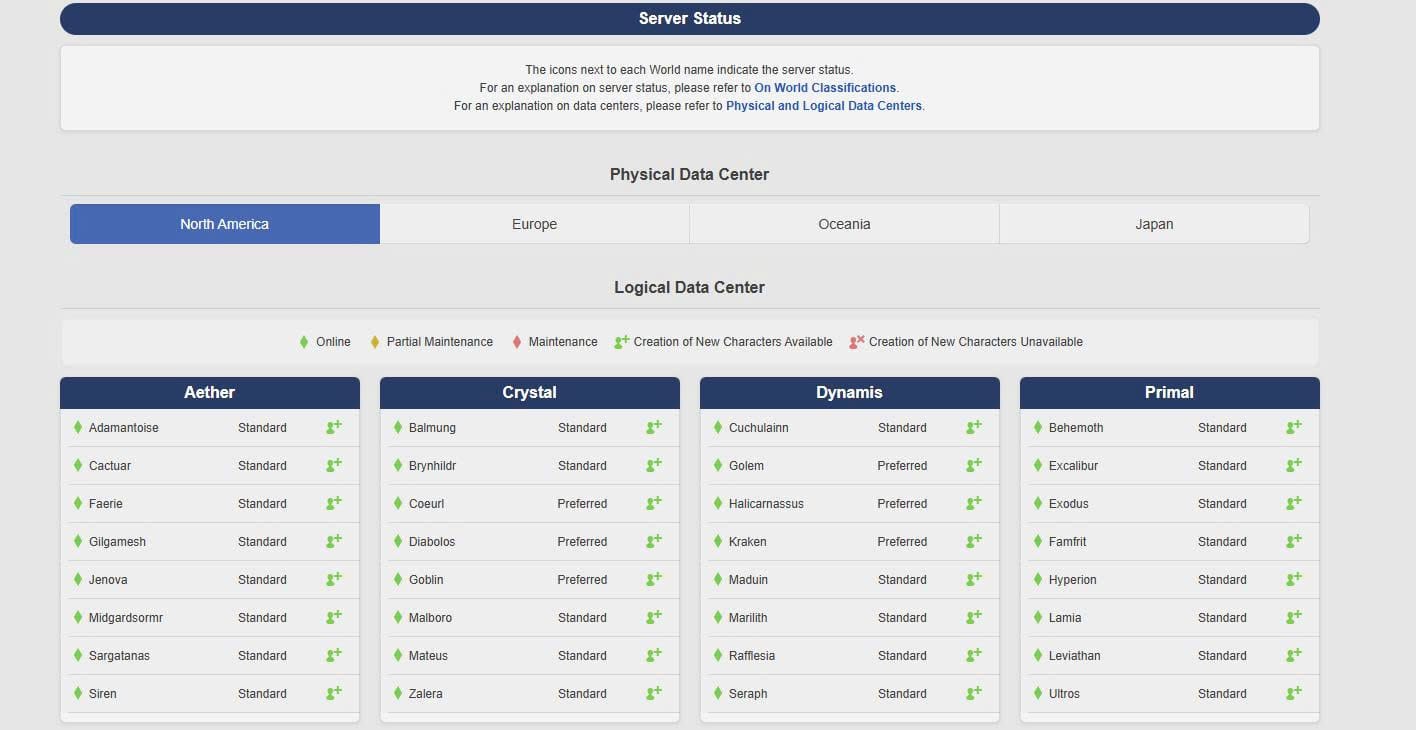
Final Fantasy XIV provides a useful example because its purchase region and server selection are clearly separate issues. Square Enix states that registration codes are region-specific: a code for one Square Enix account region cannot be registered to an account belonging to another region.
Once the license has been registered correctly, however, Final Fantasy XIV says players can play on data centers regardless of the region of their Square Enix Account, although choosing a geographically closer data center may reduce latency.
That creates two independent questions:
This is why a store page should be checked for more than supported language.
Before purchasing, record:
store country
license or product region
required publisher account region
available game servers
manual server selection
regional matchmaking restrictions
supported languages
A Japanese or North American retail version may include English or Korean text while still having license conditions different from the Korean release.
Account Linking and Cross-Platform Progress
Buying the game from another store can also introduce another account layer.
A PC game may involve:
Steam account → publisher account → game profile
A console version might use:
PlayStation account → publisher account → game profile
Cross-play only means that supported platforms can play together. It does not necessarily mean that characters, cosmetics, currencies, achievements, DLC, and saves all transfer.
Cross-progression must be checked separately.
Epic's current Fortnite support explains that when Xbox, PlayStation, PC, Switch, or mobile accounts are linked to the same Epic Games account, eligible purchased content and progress can be accessible across supported platforms, with specific exceptions such as some V-Bucks handling.
The account containing the progression matters. Epic warns that unlinking a console account and connecting it to a different Epic account does not move the Fortnite progression to the new account.
EA uses a similar publisher-account layer. For Apex Legends, platform accounts must be connected to the EA Account used for Cross Progression, and unlinking an account and linking it elsewhere does not transfer the progress.
At the same time, EA explicitly notes that cross-play and cross-progression support varies between games. Some titles support cross-play but not full progression transfer.
Before repurchasing a game on another platform, create this record:
Do not interpret the phrase cross-platform as proof that every row is shared.
Publisher Accounts and Store Accounts
The account that owns the store license and the account that owns the game data can be different.
This becomes important when a user buys the same title twice.
Suppose the original copy was purchased through PlayStation and linked to Publisher Account A. A new PC copy purchased through Steam is accidentally linked to Publisher Account B.
The player may own both game licenses and still not see the original progress.
Ubisoft Connect similarly operates across multiple gaming platforms, but Ubisoft notes that cross-play and cross-progression availability varies by game and platform. For titles supporting cross-progression, the publisher account becomes central to determining which progression is synchronized.
For a long-running account, check the publisher's Linked Accounts or Connected Accounts page before buying another version.
Record:
existing platform account
existing publisher account
new store account
account currently holding progress
account currently holding purchased items
A cheaper second copy is poor value if it creates a second isolated profile.
DLC Region and Base-Game Compatibility
DLC is one of the strongest reasons to verify region before buying an overseas console version.
PlayStation states directly that a game disc and the account country or region must be compatible for PlayStation Store add-ons and in-game currency to work with that game. PlayStation also warns that an add-on cannot be used with a disc when their regions do not match.
Individual store listings can be even more specific. Some PlayStation DLC listings explicitly state that the add-on is compatible only with an Asian version of the base game and that compatibility with versions from other regions is not guaranteed.
A common failure scenario looks like this:
Overseas physical game: inexpensive North American versionPS account: KoreanDLC: purchased from Korean PlayStation StoreResult: add-on does not recognize the foreign base-game license
The lower base-game price then becomes irrelevant.
Check the following before buying DLC:
base-game product ID or region
DLC product region
account country
edition requirement
platform generation
publisher account requirement
Season passes require another layer. A season pass can contain only specified DLC releases rather than every future expansion.
Before buying a pass on a second store, compare the contents against existing ownership. How to Compare Included Content in DLC, Expansion Packs, and Season Passes to Avoid Duplicate Purchases is useful when the same character pack, expansion, currency bundle, or deluxe-edition item appears under several products.
Do not rely on identical DLC names. Verify compatibility from the store's product page.
In-Game Currency and Platform Restrictions
Even when character progress transfers, premium currency may follow separate rules.
Fortnite demonstrates this directly: Epic says eligible purchases and progress can follow the linked Epic account across supported platforms, but V-Bucks have specific platform-related exceptions.
That means three things can simultaneously be true:
character progress is shared
cosmetics are shared
some currency balances are not identical
Similar restrictions can apply to:
- premium currency
- preorder bonuses
- platform-exclusive cosmetics
- subscription benefits
- console-specific packs
Record these separately from save-data compatibility.
A store bundle advertising 5,000 Coins + Skin Pack should not be assumed transferable merely because the base game supports cross-play.
Store Country and Regional Account Lock-In
The account region itself can be difficult to change later. PlayStation Korea states that the country or region chosen when creating the account cannot subsequently be changed. It also says PlayStation Store game content, add-ons, and in-game consumables are provided according to the country registered to the account.
PlayStation's current Korean terms further warn that services may be restricted when the registered residence does not match the user's actual residence and that SIE Korea may not support or warrant games, discs, content, or services purchased from non-Korean PlayStation Stores unless otherwise specified.
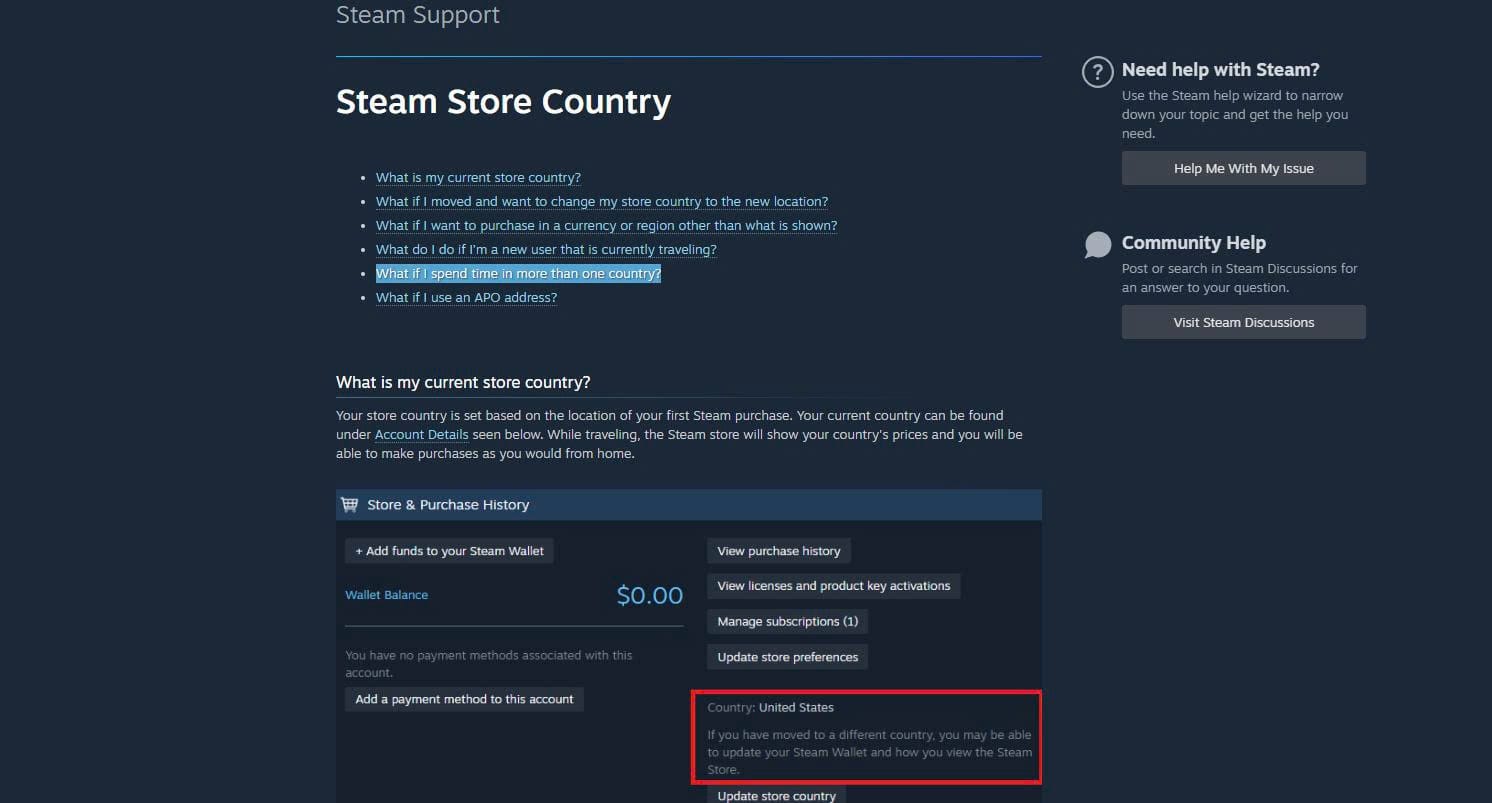
Steam uses a different model. Steam says the store country is initially based on the location of the first purchase. If a user genuinely moves and needs to update the country, the change is made through a purchase using a payment method from the new country. This is different from temporarily selecting another country to obtain a lower price.
Steam specifically states that using a VPN or proxy to disguise location to redeem region-restricted products violates its terms and can result in account restrictions. A regional discount should therefore be evaluated only when the purchase complies with the store and publisher rules.
Refund Rules Across Major Stores
Refund conditions can substantially change the risk of testing an overseas purchase.
Steam's current standard refund policy allows refund requests for games and software purchased within 14 days when the title has been played for less than two hours. Steam DLC generally follows a 14-day window as well, with the additional condition that the underlying game has been played for less than two hours after purchasing the DLC and that the DLC has not been consumed, modified, or transferred; some third-party DLC is marked non-refundable.
PlayStation Korea follows a different standard. For games, DLC, and season passes, a refund can generally be requested within 14 days only if downloading or streaming of the content has not begun, except where the product is faulty.
That difference matters immediately.
Steam: downloading and testing briefly can still fit the standard refund framework if the time requirements are met.
PlayStation: beginning the download can normally eliminate ordinary change-of-mind refund eligibility.
Xbox's Korean support currently says digital-game refunds are typically available for requests made within 14 days where a significant amount of play time has not accumulated, although approval is not automatic.
Record refund rules before downloading:
An overseas purchase may also involve foreign-card conversion or processing costs. Steam itself notes that banks in some countries may add processing, tax, or currency-conversion charges to the final payment. A refund does not necessarily reverse every bank-side exchange-rate difference.
Customer Support and Overseas Versions
Support availability should be considered before buying a version intended for another country.
PlayStation Korea's current terms explicitly warn that foreign-store titles and content may not receive the same support or warranty treatment in Korea.
For PC titles with separate publisher accounts, store support and publisher support also handle different problems.
Typical division:
Store support
- payment
- refund
- license in purchase history
- download from the storefront
Publisher support
- publisher account
- character progress
- game-server problems
- cross-save
- in-game inventory
Console-network support
- platform account
- regional DLC compatibility
- wallet or voucher problems
If the game starts but your character is missing, the store may not be the organization capable of restoring the profile.
Before buying a foreign edition, check whether customer support is available in Korean or another language you can use and whether that regional support office accepts requests concerning foreign purchases.
Overseas Purchase Verification Record
A practical purchase check can be completed before payment:
Store: Steam / PlayStation / Xbox / otherStore country: exact countryBase-game region: exact region or product codeGame language: Korean / English / Japanese / otherPublisher account: required / not requiredServer selection: automatic / manualAvailable server regions: listCross-play: yes / noCross-save: yes / noCharacter transfer: yes / noPurchased-item transfer: yes / partial / noPremium currency transfer: yes / partial / noDLC compatibility: confirmed / uncertainRefund window: exact ruleDownload effect on refund: checkedForeign-card cost: checkedKorean support: available / limited / unavailable
The decision should then follow this order:
license compatibility → server access → account linking → progression → DLC → payment → refund → support
Price belongs near the end of that sequence.
A foreign store can offer a genuinely useful discount when the license works with your account, the desired server is available, existing progress follows correctly, and DLC remains compatible.
It is not a bargain when the cheaper base game creates a second account, prevents domestic DLC from working, strands purchased items on another platform, or leaves you outside the normal refund and support route.